Leveraging the Nikon ZR’s Cinema Interface: A Guide for Filmmakers
The Nikon ZR introduces a new cinema user interface that’s designed to streamline your workflow and give you quick access to powerful tools. Whether you are shooting films or creating content, this interface ensures that essential functions are always within reach.
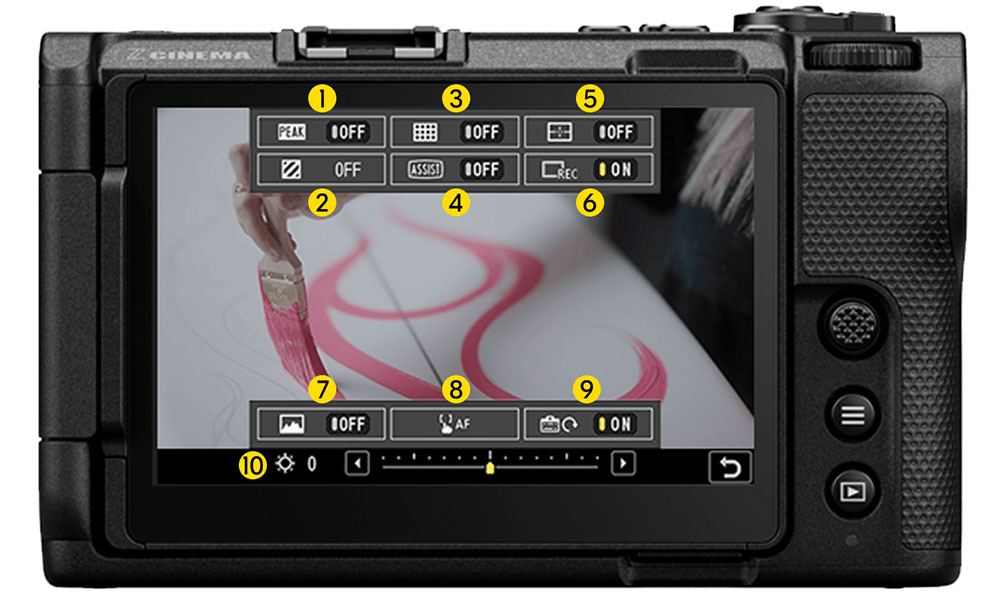
An illustrated preview of the cinema interface as it appears on the ZR. Each number highlighted in a yellow circle corresponds to the specific control listed below.
Intuitive On-Screen Display
Located at the bottom-right corner of the live-display screen, the cinema interface provides a dedicated menu for video-centric features. From this panel, you can easily toggle and adjust key settings without diving into complex menus. The controls include:
- Focus Peaking
- Zebra Pattern
- Composition Grid
- LUT Display Assist
- Virtual Horizon
- REC Indicator
- Waveform Monitor
- Touch Autofocus
- Vertical Video Rotation
- Monitor Brightness Control
A Breakdown of Each Control
Focus Peaking: Highlights areas of sharp focus in your frame for precise manual focusing.
Zebra Pattern: Displays striped overlays on overexposed areas to help manage exposure.
Composition Grid: Adds grid lines to assist with framing and composition alignment.
LUT Display Assist: Applies a LUT for previewing color graded looks during shooting.
Virtual Horizon: Shows a horizontal level indicator to keep your shot perfectly balanced.
REC Indicator: Displays a red box around the shooting frame when recording is active.
Waveform Monitor: Provides a real-time luminance graph for precise exposure control.
Touch Autofocus: Allows you to set focus points quickly by simply tapping on the screen.
Vertical Video Rotation: Automatically rotates the interface for native vertical shooting.
Monitor Brightness Control: Adjusts screen brightness for optimal monitor viewing.
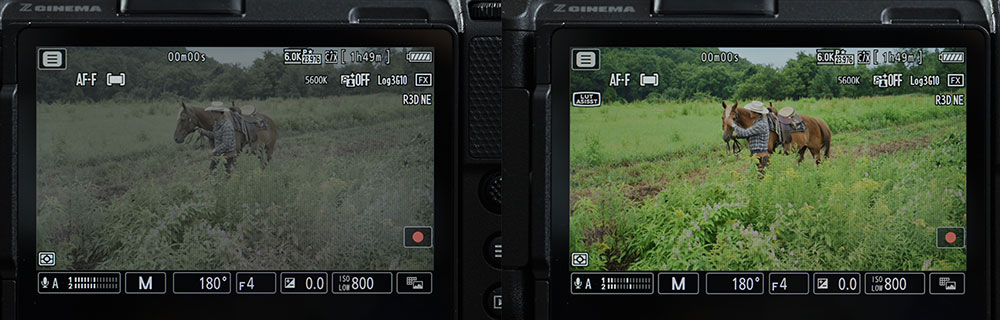
This pair of images illustrates the effects of the LUT Display Assist Control. The left side shows the control turned off, which displays a Log view. The right side shows the control turned on, which displays a LUT or a Rec 709 look if a LUT is not activated.
The Impact of an Intuitive Cinema Interface
Quick menu enhancements give filmmakers greater control and flexibility on set. By reducing menu diving and offering real-time feedback, the cinema interface on the Nikon ZR empowers our users to focus on storytelling rather than navigating technical controls.